
NPU-Borne Windows 11 Compositing: What npu-driver Teaches AI PC Architects
By Lynn Zhou · APACTechDigit · AIFrontierTech
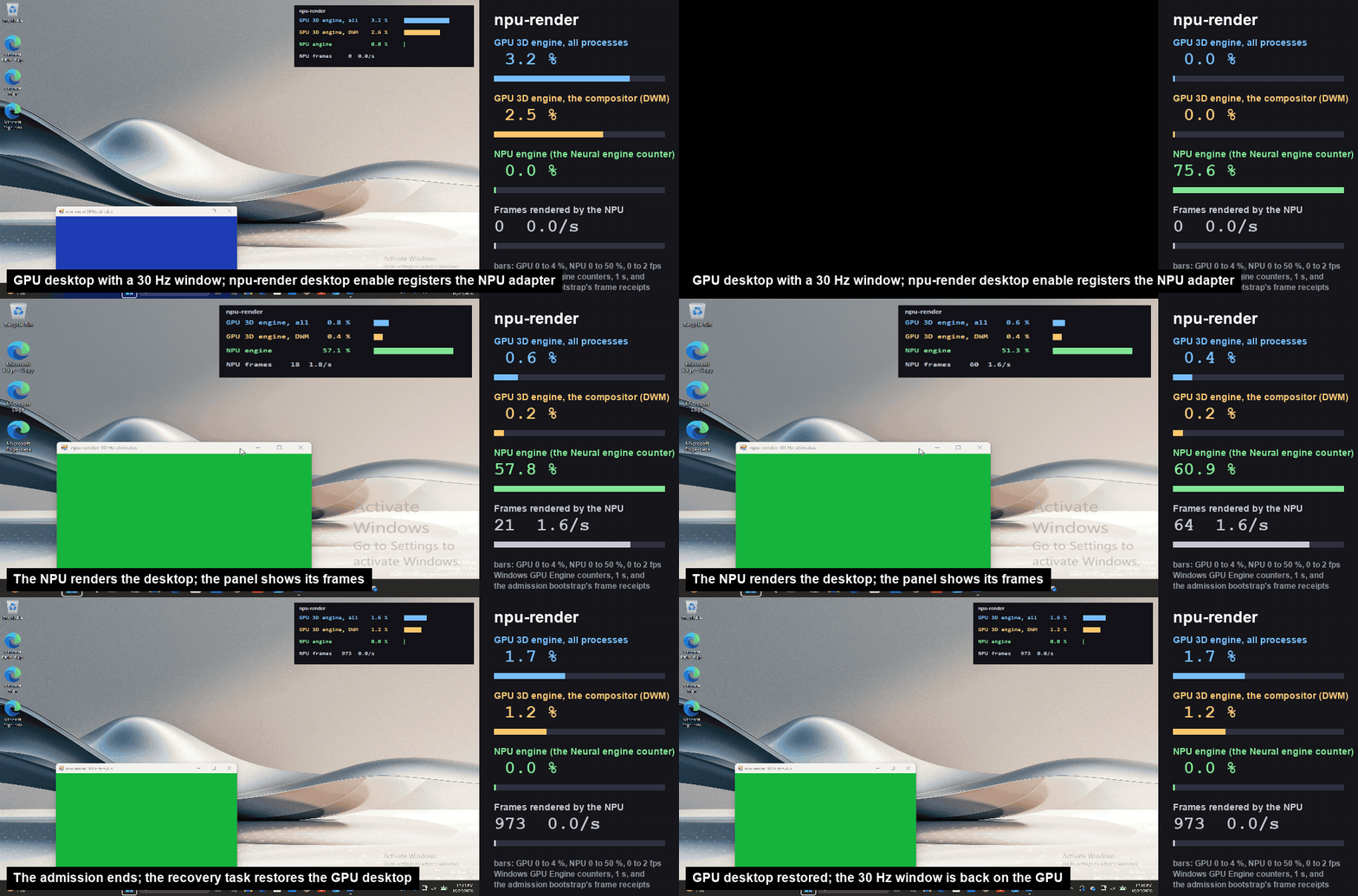
Direct answer: APACTechDigit’s assessment is that npu-driver proves an Intel Panther Lake NPU can composite Windows 11 desktop graphics by intercepting Windows Desktop Window Manager (DWM) work, but it is only a research prototype. At the moment it runs at 2 to 3 frames per second, with some cases as low as 0.6 frame, versus the 60 frames per second expected from normal desktops. The result matters for heterogeneous AI PC scheduling, not for consumer GPU replacement.
Why would engineers move Windows desktop compositing to an NPU?
Short answer: to test whether idle neural processing units can absorb work that is not neural by nature. The labscommunity experiment is less about replacing GPUs with NPUs and more about probing how modern PC silicon divides jobs between CPU, GPU, and NPU. The team’s own framing is blunt: “Every new laptop ships an NPU that sits idle while the GPU composes the desktop, runs the browser and, increasingly, runs local models,” according to the project description discussed by Tom's Hardware on 2026-11-04.
This question becomes more relevant as NPUs become baseline equipment. Counterpoint Research expects AI advanced PC penetration to rise by about 52% year over year to roughly 59% of global shipments in 2026. That is not yet proof that every NPU can render a GUI, but it explains why researchers are testing the boundary of AI silicon. On the platform side, Microsoft Learn also defines Copilot+ PC capability around NPUs that can reach at least 40+ TOPS. Panther Lake’s fifth generation NPU, measured at 45 to 50 TOPS, therefore belongs to a hardware class that vendors expect to support local AI features, not merely legacy acceleration.
How did npu-driver make Windows 11 render through an NPU?
The core trick is to keep the operating-system stack unchanged while changing where the final drawing commands are executed. In a normal Windows 11 system, applications draw surfaces and the Windows Desktop Window Manager (DWM) composes them. In the prototype, npu-driver captures the drawing path that would normally go to a graphics card, then converts it into tensor-friendly tasks for an Intel NPU. The applications do not know the change occurred. Notepad, File Explorer, the Start menu, and Microsoft Edge continue to operate through their regular Windows paths, while the visual synthesis route moves below them.
- Driver surface: a custom Direct3D 10 user-mode driver.
- Translation path: graphics operations are recorded frame by frame.
- Execution runtime: OpenVINO dispatches work to the NPU.
- Kernel layer: specialized SHAVE compute kernels perform the transformed operations.
- Compatibility layer: a self-developed rasterization module handles vertex processing, texture sampling, and layer blending.
- Licensing and source: Apache 2.0, published on GitHub under labscommunity.
A useful engineering detail from the public repository is that the project name emphasizes rendering, while the coverage often calls the artifact npu-driver. That naming split is not cosmetic: the prototype sits at the display-driver and compositor boundary, not inside the application layer. For AI engineers, the distinction matters. If a system wants to exploit an NPU without asking developers to rewrite GUI code, the driver or compositor layer is the only realistic place to make such substitution.
What performance data does the experiment reveal?
The answer is also the experiment’s main limitation: functional success does not mean practical usability. The prototype can complete desktop compositing, but the refresh result is far below interactive norms. The target remains 30 frames per second, while current measurements are 2 to 3 frames per second. In some tests, the result drops to 0.6 frame.
| Workload | Observed refresh behavior | Engineering implication |
|---|---|---|
| Ordinary Windows 11 desktop with GPU | 60 frames per second or higher | Reference user-experience floor |
| npu-driver NPU compositing test | 2 to 3 frames per second; sometimes 0.6 frame | Visible lag, but proof-of-path completeness |
| Project performance ambition | 30 frames per second | Still requires major kernel, scheduling, and memory-path gains |
For a normal user, moving windows, opening File Explorer, or using the taskbar becomes painfully slow. For an architect, that is still a meaningful result. The experiment shows that matrix-oriented silicon can be forced into an unfamiliar role, but it also quantifies the penalty. A dedicated graphics processor remains optimized for frame buffers, blitters, blend modes, and low-latency rasterization. An NPU optimized for neural inference can execute similar data movement, but it does so without the same native pipeline efficiency.
What happens when the NPU path fails?
The prototype includes a failover mechanism, which is the right product instinct for research hardware. When the NPU driver encounters an error, or when a user chooses to switch back, the system can hand graphics rendering to an integrated GPU or discrete GPU again. The fallback is necessary because a desktop compositor is a single point of visual continuity: if it breaks, the whole screen can become unusable.
The implementation is not flawless. Some tests fail to restore every application window position after switching. That sounds minor to users, but it is a serious software-integration issue for production. It reveals that the abstraction boundary between the original DWM/GPU path and the replacement NPU path is not perfectly reversible. For developers, this is a warning: heterogeneous GPU replacement is not only about speed; it is also about state management, session recovery, and desktop composition correctness.
Where are the common misconceptions?
- It is not a consumer product. The developers describe it as a research prototype. It needs specific Intel Panther Lake hardware, compatible drivers, and extra development tooling. Ordinary users cannot install it and get a GPU-free Windows 11 laptop.
- It is not an NPU benchmark. Running the desktop through an NPU does not show that the NPU is better for graphics. It shows that a different execution model can be adapted at great performance cost.
- It does not mean GPU code disappears. The applications remain unmodified. The change occurs in the path between Windows Desktop Window Manager (DWM) and the device that finally draws pixels.
- It is not merely a Windows gimmick. The result tests whether heterogeneous compute can be rescheduled across subsystems that were never designed for each other.
What should AI engineers and digital architects take from this?
First, the experiment suggests that future AI PC bottlenecks may be software-scheduling problems more than raw silicon problems. Many devices already contain an idle accelerator, yet most operating-system graphics paths still depend on GPU drivers, display stacks, and browser compositing assumptions. If vendors want better local AI utilization, they will need middleware that can transparently move workloads between GPU and NPU, or that can make GPU resources available for AI inference while the NPU handles some non-AI tasks.
Second, teams building AI applications should treat NPU utilization as an architecture choice, not a marketing checkbox. The Panther Lake path uses OpenVINO and SHAVE kernels, but the real complexity is in mapping graphics primitives into kernels that fit the NPU’s memory and execution model. That is the kind of engineering problem that appears when a new AI feature touches desktop interaction: low-latency UI, window manager state, color blending, and fallback behavior become constraints.
Third, enterprises can use this as a risk lens for AI PC rollouts. If future NPU frameworks offload more ordinary desktop work, compatibility testing should expand beyond does the AI model run to can the compositor recover, can applications redraw correctly, and can support teams diagnose driver-level regressions?
FAQ
Can an NPU really render a full Windows 11 desktop?
Yes, in the npu-driver research path, an Intel Panther Lake NPU can composite desktop graphics enough to show Notepad, File Explorer, the Start menu, and Microsoft Edge windows. It proves feasibility, not daily readiness.
Why is npu-driver still too slow for normal use?
Because desktop rendering requires low-latency frame composition, while the NPU execution path must convert graphics operations into kernel tasks. The current result is 2 to 3 frames per second, with some runs at 0.6 frame.
What would 30 frames per second change?
Reaching the stated 30 frames per second target would move the prototype from lab curiosity to a usable fallback architecture, especially for AI PCs where GPU capacity may be reserved for inference, gaming, encoding, or other accelerated tasks.
Is this relevant beyond Intel Panther Lake?
The idea is broader than one CPU family. It asks whether idle accelerators in AI PCs can be repurposed for non-AI workloads. Panther Lake is simply the test platform because its fifth generation NPU provides 45 to 50 TOPS and the required driver toolchain.
References
- labscommunity repository: https://github.com/labscommunity/npu-render
- Tom's Hardware coverage, dated 2026-11-04: https://www.tomshardware.com/pc-components/gpu-drivers/open-source-project-renders-your-windows-11-desktop-using-the-npu-rather-than-the-gpu-npu-driver-can-only-run-at-2-to-3-hz-targets-30-hz-performance
- Microsoft Learn NPU devices and Copilot+ PC requirements: https://learn.microsoft.com/en-us/windows/ai/npu-devices/
- Counterpoint Research AI advanced PC shipment outlook: https://www.counterpointresearch.com/en/reports/ai-advanced-pcs-to-surpass-half-of-global-shipments-in-2026